
How do I limit daily connection requests and safely ramp up sending?
Control your daily sending pace and gradually increase volume to stay within LinkedIn's limits and avoid restrictions.
Before you begin: Recommended limits are 25 connection requests per day and 25-30 InMails per day. See What are sending limits for Connects and InMails for details.
Set Daily Connection Limits
Valley lets you control exactly how many messages go out each day per campaign.
During campaign creation:
In the campaign setup flow, look for the Daily Sequence Volume slider
Drag the slider to set your daily limit (default is 25)
If running multiple campaigns, divide your daily target across them (e.g., two campaigns at 12-15 each instead of both at 25)
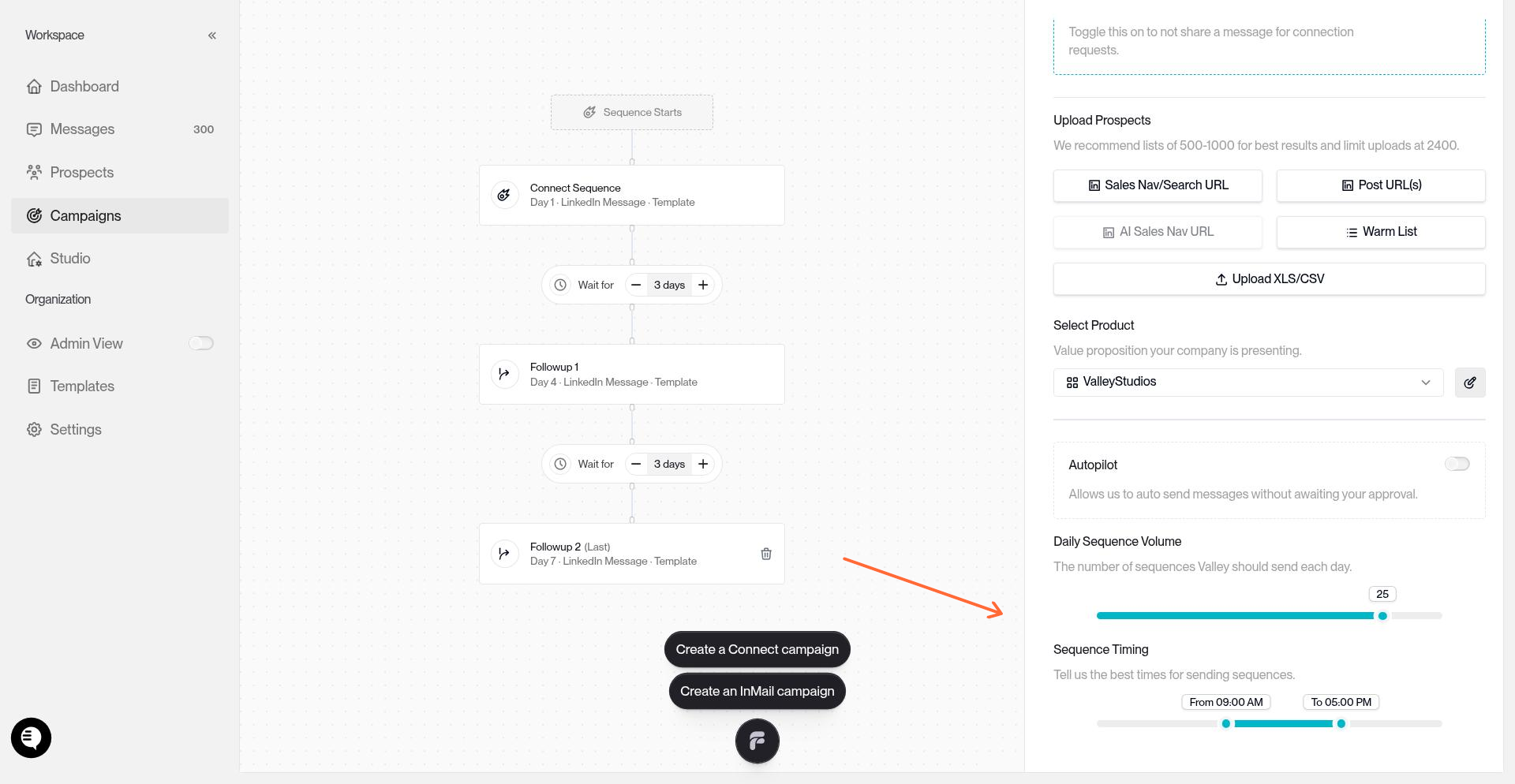
If you're running multiple campaigns, the total sends per day is the sum across all campaigns. Two campaigns at 30/day each = 60/day total, which exceeds safe limits.
Configure Your Sending Window
Set when messages go out during the day using the Sequence Timing sliders.
Use the From slider to set your start time (e.g., 9:00 AM)
Use the To slider to set your end time (e.g., 5:00 PM)
Valley spreads sends randomly throughout this window to mimic natural behavior
Match your sending window to your target audience's time zone. If you're reaching US prospects from Europe, shift your window to align with their business hours.
Monitor Your Sending Pace
The Connects Sent widget on your dashboard shows your current pace versus your daily limit.
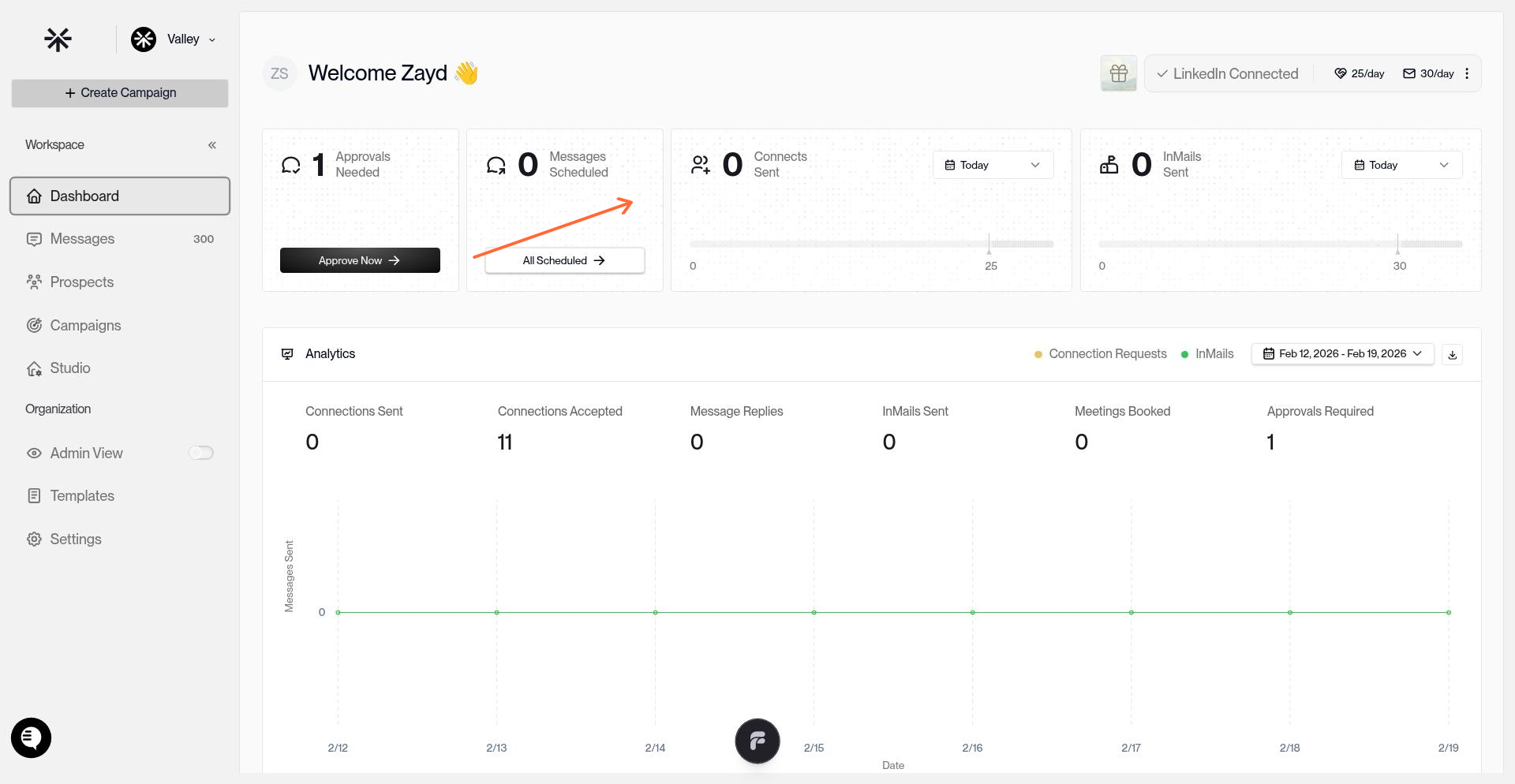
Check this regularly to confirm you're staying within safe limits, especially when running multiple campaigns.
Safely Ramp Up Sending
If your account is new, dormant (inactive 6+ months), or you're resuming after a pause, don't jump straight to maximum volume. LinkedIn flags sudden activity spikes as bot behavior.
Week 1: Start Low
Set Daily Sequence Volume to 5-10 per day
Post on LinkedIn manually 1-2 times
Comment on and like a few posts daily
Ensure your profile is 100% complete (photo, headline, about section, experience)
Week 2: Increase Gradually
Increase Daily Sequence Volume to 15-20 per day
Continue manual activity (posting, commenting, engaging)
Week 3-4: Reach Full Volume
Increase to your target daily limit (25 per day for connection requests, 30 per day for InMails)
If your account has been actively used for 6+ months with regular posting and engagement, you can skip the ramp-up and start at full volume immediately.
Resuming After a Pause
If you paused campaigns for a week or more, don't restart at full volume. Follow a shorter ramp-up:
Days 1-3: 50% of your previous daily limit
Days 4-7: 75% of your previous daily limit
Day 8+: Resume full daily limit
Best Practices
Spread volume across campaigns carefully. If running 3 connect campaigns, set each to 8-10/day instead of 25/day each
Use warm lists when possible. Profile viewers, post engagers, and followers have higher acceptance rates and look more natural to LinkedIn
Vary your daily volume slightly. Don't send exactly 25 every day. Adjust the slider occasionally (22 one day, 28 the next) to avoid robotic patterns
Run only Valley on your LinkedIn account. Multiple automation tools trigger restrictions. See LinkedIn Safety & Account Health
If you receive a LinkedIn warning ("Please slow down" or "Unusual activity detected"), pause all campaigns immediately. Wait 24-48 hours, then resume at 50% of your previous daily limit and ramp back up over a week.