
Solo Founder Fast Track
Get your first LinkedIn outreach campaign running in 15 minutes.
Step 1: Create Your Account (2 min)
Go to app.joinvalley.co and sign up
Create a workspace - name it your company name or something simple like "Outreach"
Step 2: Connect Your LinkedIn (3 min)
Make sure you're logged into YOUR LinkedIn in your browser
Download the Valley Chrome extension from the Chrome Web Store
Click the puzzle piece icon in your Chrome toolbar
Click the Valley extension > Connect LinkedIn
Wait for the connection to complete, then refresh Valley
Step 3: Set Up Studio (5 min)
Create a Product
Go to Studio > Products > Create Product and Valley automatically generated the following. All you have to do it review and make edits as you see fit.
Company description: What your company does in 1-2 sentences. Be specific, not generic.
Value props: 3-4 key benefits with numbers when possible (e.g., "Book 15+ qualified meetings/month")
ICP: Valley automatically generates an ICP using the Always Score High / Always Score Low framework.
Pain points: What problems your customers face (e.g., "Low reply rates on cold outreach," "Spending hours on manual prospecting")
Proof points: Social proof and metrics (e.g., "500+ customers," "Featured in TechCrunch")
Booking link: Your Calendly or Cal.com URL (Valley does not fill this automatically)
Also add your booking link in Settings > Profile.
Create a Writing Style
Go to Studio > Writing Styles > Create New Style.
Valley offers a few starter templates - the "Valley" template is the best starting point for most users. Select it, then customize your DOs and DON'Ts to match your voice:
DO: "Use short, conversational sentences. Reference their recent LinkedIn activity."
DON'T: "Don't use corporate jargon. Don't include booking link in first message."
Fill in the LinkedIn Sequence section and complete the Advanced Questions (9 questions that dramatically improve message quality).
Don't overthink it. Write your DOs/DON'Ts like you'd explain your communication style to a new team member. You can refine after seeing your first batch of messages.
Step 4: Launch Warm List Campaigns (3 min)
Start with warm lists - they get 4x the reply rate of cold outreach.
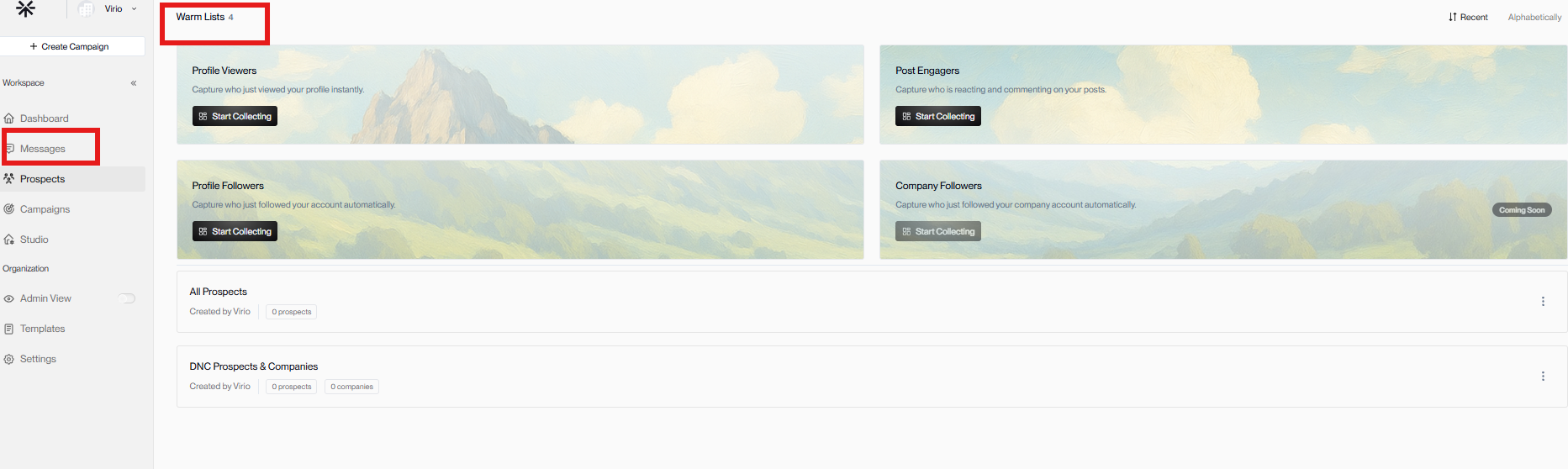
Profile Viewers
Go to Warm Lists > Profile Viewers
Click "Start Capturing"
Valley begins capturing people who view your LinkedIn profile daily
Post Engagers
Go to Warm Lists > Post Engagers
Add 3-5 LinkedIn influencer URLs (thought leaders in your space whose audience matches your ICP)
Click "Start Fetching" and wait ~5 minutes
Select your Product
Both warm lists feed prospects into campaigns automatically. Valley scores them against your ICP and generates personalized messages.
Step 5: Launch Imported List Campaigns (2 min)
For broader reach, add a SalesNav or CSV campaign:
Go to Create Campaign
In the create campaign window, select both Connect and InMail
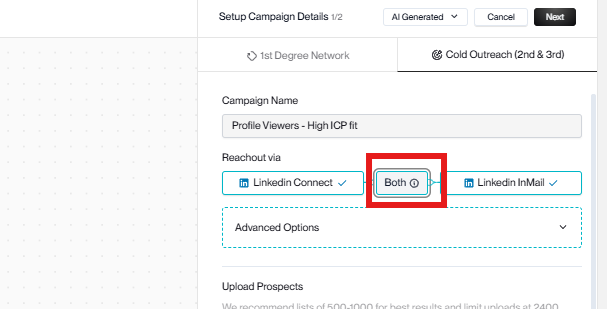
Paste your SalesNav search URL or upload a CSV
Select your Product and Writing Style
Enter Training Mode - review messages, give feedback
Click Launch
Use One List for Full Coverage
Use the same prospect list and select both outreach types in the campaign window. Do not create separate campaigns from the same list.
Step 6: Enable Autopilot (1 min)
On each campaign you've launched, toggle Autopilot ON. This lets Valley send approved messages automatically without you clicking approve on each one.
Autopilot is a per-campaign toggle, not a global setting. Turn it on for each campaign individually. Without Autopilot, you'll need to manually approve every message.
Step 7: Delete Low ICP Fits
For your imported list campaigns (SalesNav or CSV):
Click the three dots menu on the campaign card
Select "Delete Low ICP Fits"
This removes bad-fit prospects so your daily sends focus on the best matches. Warm list campaigns filter for High ICP Fit by default.
Daily 5-Minute Routine
Check your Inbox for new replies (Interested and Might Be Interested first)
Respond to interested prospects quickly - same day
Handle any pending Approvals
Apply Meeting Scheduled tag when meetings book
That's it - Autopilot handles the sending
What's Next?
Once campaigns are running, move to the 30-Day Roadmap to:
Refine your ICP based on reply patterns
Update your Writing Style DOs/DON'Ts based on what messages get replies
Add more influencers to Post Engagers
Expand SalesNav searches into adjacent segments
Connect HubSpot if you use it (Settings > Integrations)