
Why is my campaign stuck in fetching prospects?
Campaigns normally fetch prospects in 1-2 hours. If your campaign shows zero leads or remains in "fetching" beyond 2 hours, follow this troubleshooting checklist.
Check your Sales Navigator URL
The most common cause is an incorrect URL format:
Use people search URLs only — Must start with
linkedin.com/sales/search/people?...Avoid saved or account lists — These are user-specific and return zero results if it's created in someone else's sales navigator account. Unsave the list and use the search URL instead.
Keep lists under 2700 prospects — Larger lists may time out. Narrow your filters if needed.
Find the correct URL format in How to Create a Campaign.
Reduce restrictive filters
Too many Sales Navigator filters can cause fetching to hang or time out. Simplify your search to a broader audience, then delete low-fit prospects after the fetch completes.
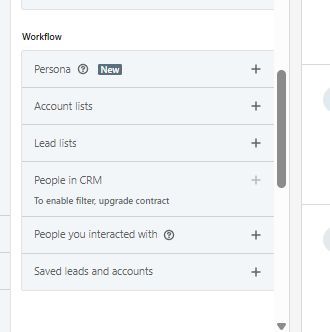
Additionally, avoid using any filters in the workflow section.
Look for duplicate prospects
Valley automatically filters prospects already in other campaigns or uploaded by teammates. If your list shows zero leads, duplicates may have been removed. Check Managing Prospects to see where these prospects exist.
Trigger a refetch
If the campaign is still stuck after 2 hours:
Launch the campaign (even if fetching isn't complete — it runs in the background).
Click the three-dot menu on the campaign.
Select Refetch to restart the process.
Confirm Sales Navigator access
Valley requires an active Sales Navigator subscription. If your subscription lapsed or your connection expired, reconnect in Settings.
If fetching hasn't started after 4+ hours during peak times, contact support. System load occasionally delays processing.